OpenSprinkler › Forums › OpenSprinkler Unified Firmware › OpenSprinkler Drops WiFi Regularly
Tagged: Wi-Fi drop WMM ESP32
- This topic has 21 replies, 10 voices, and was last updated 1 month, 3 weeks ago by
Ray.
-
AuthorPosts
-
August 21, 2021 at 6:26 am #70949
Kevin ForthParticipantI like my OpenSprinkler device, but it’s very frustrating that it drops WiFi almost daily. I see many other forum posts with the same experience, so I’m concerned that there is no fix. If I reboot my router, the connection is restored, but this is a crutch.
I am running firmware 2.1.9 (8), hardware 3.2 (AC), app version 2.2.4. I have 11 zones, so I use the Zone Expansion unit.
I moved my router so that it’s only 25 feet from the OpenSprinkler controller, but the WiFi drops continue. I have a single access point, no range extenders, but I shouldn’t need one. When the connection is working, performance is good.
Router is an Asus RT-AX58U with firmware 3.0.0.4.386_43588-g814828f (latest version).
Has anybody found a reliable solution to this issue?
August 22, 2021 at 6:24 pm #70966
RayKeymasterUnfortunately we do not know why the WiFi drops off in some cases. We were never able to reproduce the issue on our own test network. I don’t think it has to do with how far the router is to your controller, rather, it has to do with the router kicking the device off its network for some reason.
We did release a new version of the firmware 2.1.9(9) just today, which contains a new feature that allows using a program to trigger a reboot on a regular basis. So if you have WiFi reliability issues, you may want to give this a try to see if rebooting once per day or maybe per 2 days etc can help.
August 23, 2021 at 4:45 am #70970
Kevin ForthParticipantThanks Ray, appreciate the reply. I’ll look at 2.1.9(9).
Cheers.
August 29, 2021 at 3:35 pm #71018
JaroslawParticipantThe new “reboot” solution is better than nothing but it is kind of hunting with a shotgun for mosquitoes. Firmware should regularly check if there is a WiFi connection. If not, it should try to reconnect. In my case, I have no drops problem, but from time to time it happens that my hose loses power supply. In such case, WiFi starts slower than OpenSprinkler and it can’t connect and is left in this state as it never tries to do this again.
August 29, 2021 at 7:13 pm #71019
Kevin ForthParticipantSince I’ve used the daily reboot program, OpenSprinkler drops WiFi more consistently, within 30 minutes to 2 hours following each reboot. It doesn’t appear that the reboot function has helped. May be a bit worse with the reboots, as I could sometimes go 2 to 3 days without a WiFi disconnect before using the reboot program. Now it loses connectivity daily.
August 31, 2021 at 12:56 pm #71035
RayKeymaster@Jaroslaw: the firmware already checks if WiFi is dropped and attempts to reconnect:
https://github.com/OpenSprinkler/OpenSprinkler-Firmware/blob/master/main.cpp#L562
Problems with WiFi may be more elusive than you think. The difficulty is that at internal testing, we’ve never observed WiFi dropping issues. We have 3 different test routers and none of them has any dropped WiFi issue. We’ve also testing unplugging and replugging WiFi router to simulate a WiFi drop, and the controller works fine after the router came back online. We suspect the WiFi issues some users experienced are during to their specific router or WiFi environment — there can be interference, the router may kick devices out for no obvious reason. In any case, if we were able to reproduce the issue we would obviously have introduced solutions to it. The fact is that during testing we couldn’t reproduce the issue so we don’t know what’s causing the wifi dropping issue.August 31, 2021 at 1:28 pm #71036
JaroslawParticipantI didn’t notice added check. Maybe it is because I can’t find firmware changes page on forum where all changes will be summarized.
Dropping connection can be problem on antenna (access point/router) side. Some antennas disconnect clients if their signal is below certain minimal strength/quality level. OpenSprinkler by design is more frequently located in distance from antenna.September 1, 2021 at 6:05 pm #71051
[email protected]ParticipantBut this error happens with wired connection too
September 8, 2021 at 7:22 am #71098
BetterkeksParticipantI had the exact same problem. I followed the advice of others also experiencing that exact same problem and created a virtual Wi-Fi network with Wi-Fi Multimedia (WMM) DISABLED. I created a virtual Wi-Fi network because disabling WMM really isn’t what you ordinarily want to do.
When I then bought some LIFX smart lightbulbs a little later, they ALSO kept dropping off, UNTIL I moved them onto the WMM-disabled Wi-Fi network.
I wonder if OpenSprinkler and the LIFX bulbs use the same chip.
@Ray, if you are interested let me know and I’ll share with you my exact router details and the firmware it’s running. If I enable WMM then boom problem reappears, if I disable it then voila the problem is gone.Regards,
Stephan.September 8, 2021 at 5:20 pm #71103
RayKeymaster@Betterkeks: interesting, I had no idea about WMM (my router doesn’t have this option). But this is certainly worth investigating given the clear symptoms you reported. Let me know your router details and the firmware it’s running. The controller uses ESP8266, which is quite common in a lot of WiFi devices, particularly WiFi power sockets etc. I did a quick search of ESP8266 and WMM, and it seems to be an known issue:
https://github.com/esp8266/Arduino/issues/2795
I will be reading more about this and see if it can be solved in firmware.September 8, 2021 at 7:59 pm #71110
BetterkeksParticipantRouter: Linksys WRT3200ACM
Firmware: DD-WRT v3.0-r44251If you need help to set it up, let me know.
There are later versions of firmware, and moving to a later (but stable) version has been on my todo list for a while. However, please note that EARLIER versions exhibited the same behaviour for WMM and OpenSprinkler, so newer versions are likely (but not certain) to require the same workaround.
The ESP8266/WMM interplay is also discussed here and there on the DD-WRT forums.
June 26, 2023 at 5:06 pm #76216
OpenSprinklerShop GermanyParticipantAnother tipp for better wifi:
– When connecting, when you access the 192.168.4.1 page, select your wifi, enter your password AND CLEAR THE CHANNEL (last field)
– If using a Fritz!Box: Disable “WLAN-Übertragung für Live TV optimieren” under the wifi channel menuNovember 30, 2024 at 11:38 pm #80910
stevebParticipantI had the same problem with my opensprinkler 3 connecting and disconnecting from wifi. I seem to have resolved it by disabling Wi-Fi Agile Multiband on my router wifi settings. Link below has some good suggestions for improving IOT device compatibility for ASUS routers.
https://www.asus.com/au/support/faq/1042475/September 18, 2025 at 12:03 am #83744
RayKeymasterThanks for sharing the tip. I just recently received the following tip from a user:
I have been on a quest to figure out why my OpenSprinkler DC is losing connectivity over WiFi after a few minutes after turning it on, and I’ve narrowed it down to the device not responding to ARP requests. This appears to be a known issue with the ESP8266 WiFi software, see https://github.com/esp8266/Arduino/issues/6886
I realized that I can actually work around this issue by enabling “Proxy ARP” on my WiFi access point settings (I use UniFi wifi.) This is a setting that allows the access point to respond to ARP requests on behalf of the device, and it completely solved my issue.
I bring this up because in your troubleshooting guide here: https://openthings.freshdesk.com/support/solutions/articles/5000859137-troubleshooting-and-technical-help you say:
> In some cases, the WiFi chip may have compatibility issues with certain routers, leading to intermittent connections. If so, switching to a different WiFi router may be the best solution.This technically true in that there are issues with certain routers, but it would definitely be worth documenting here that users should check their router’s settings for something like “Proxy ARP” (which should be turned on) or a similar setting.
September 18, 2025 at 7:32 am #83745
KenParticipantHello! Yes, that user was me, here’s some details about my investigation (TL;DR: Make sure your WiFi access point/router has “Proxy ARP” enabled.) I tried posting this yesterday but my post kept getting deleted, maybe marked as spam, so here it goes again:
The problem I’ve found, is that the OpenSprinkler’s WiFi chip does not respond to broadcast ARP requests after it initially connects to WiFi, which leaves clients unable to connect to it after the initial ARP entry expires, which is typically around 20 minutes or so.
Best I can tell, this is a known issue with the WiFi software on the ESP8266 chip, where once it enters a sleep mode, it no longer responds to broadcast traffic like ARP, and only wakes up when a packet is sent directly to it. (But once the ARP entry expires from your computer/phone/etc, you can’t send packets directly to it, because it isn’t answering ARP queries.) I checked with a tcpdump and could see plain as day that the ARP replies stopped coming shortly after the device finished booting.
To reproduce this issue, you can try removing the ARP entry from your system and see if you can still connect to your OpenSprinkler:
arp -d <open-sprinkler-ipIf ARP is working properly, this shouldn’t cause any issues, since your machine will look up the MAC address again on the next packet it sends. If you can no longer connect to it, you likely have the same issue as me. You can manually add an ARP entry back again with:
arp -s <your-opensprinkler-ip> <your-opensprinkler-mac-address>If if works again now, you have the same issue as me.
In my case, I tried two approaches: One, I patched the OpenSprinkler firmware to send “gratuitous ARP” every second. That actually fixed things, but it means my network is getting broadcast traffic every second, which is wasteful and is a band-aid solution.
My second approach was to go to my WiFi network settings (I use UniFi Network) and enable “Proxy ARP” for my network, which allows a wireless access point to respond to ARP requests on behalf of devices. This fixed everything.
Many WiFi networks have Proxy ARP enabled by default, since it can cut down on a ton of broadcast traffic over the air. But if yours is disabled for some reason, try enabling it and see if that fixes your issues.
July 27, 2026 at 4:00 am #87071
pgrfxParticipantHallo!
Are there any news on this topic from opensprinkler side? I have the same problem – and will test the ARP workaround.
Thx, Peter
August 4, 2026 at 7:20 pm #87204
RayKeymasterThis happens because the ESP8266 is a small embedded microcontroller that can easily get overwhelmed by too many background network requests on busy networks, causing it to lock up and drop the connection. It doesn’t run a Linux system, and does not have the ability to handle complex network or heavy traffic.
The two most effective solutions are:
1. Daily Scheduled Reboot: If it only drops about once a day, you can set up a special program (detailed in the user manual) to automatically reboot the controller at a fixed time to re-initialize the network. This is fully automatic and does not require manual rebooting.
2. Network Isolation (most effective solution): Put the OpenSprinkler downstream behind its own separate router (like a cheap travel router). This shields it from your main network’s heavy traffic and is the most effective fix.
August 10, 2026 at 4:50 pm #87280
michael6ParticipantRay, spot on; thanks for the conceivable explanation 👍🏼👍🏼👍🏼
I can confirm a stable connection now (constantly for more than 1,5 days post installation) after putting OpenSprinkler behind a small, cheap router. I added a rule that a specific router port (e.g. 3102) forwards an OpenSprinkler access traffic to port 80 of the downstream OpenSprinkler. One just needs to adjust the ip- and port number how to access OpenSprinkler in the home network.
A 15+ months journey of searching a solution has successfully come to and and.
August 11, 2026 at 2:21 am #87282
pgrfxParticipantThx for the answers and solutions.
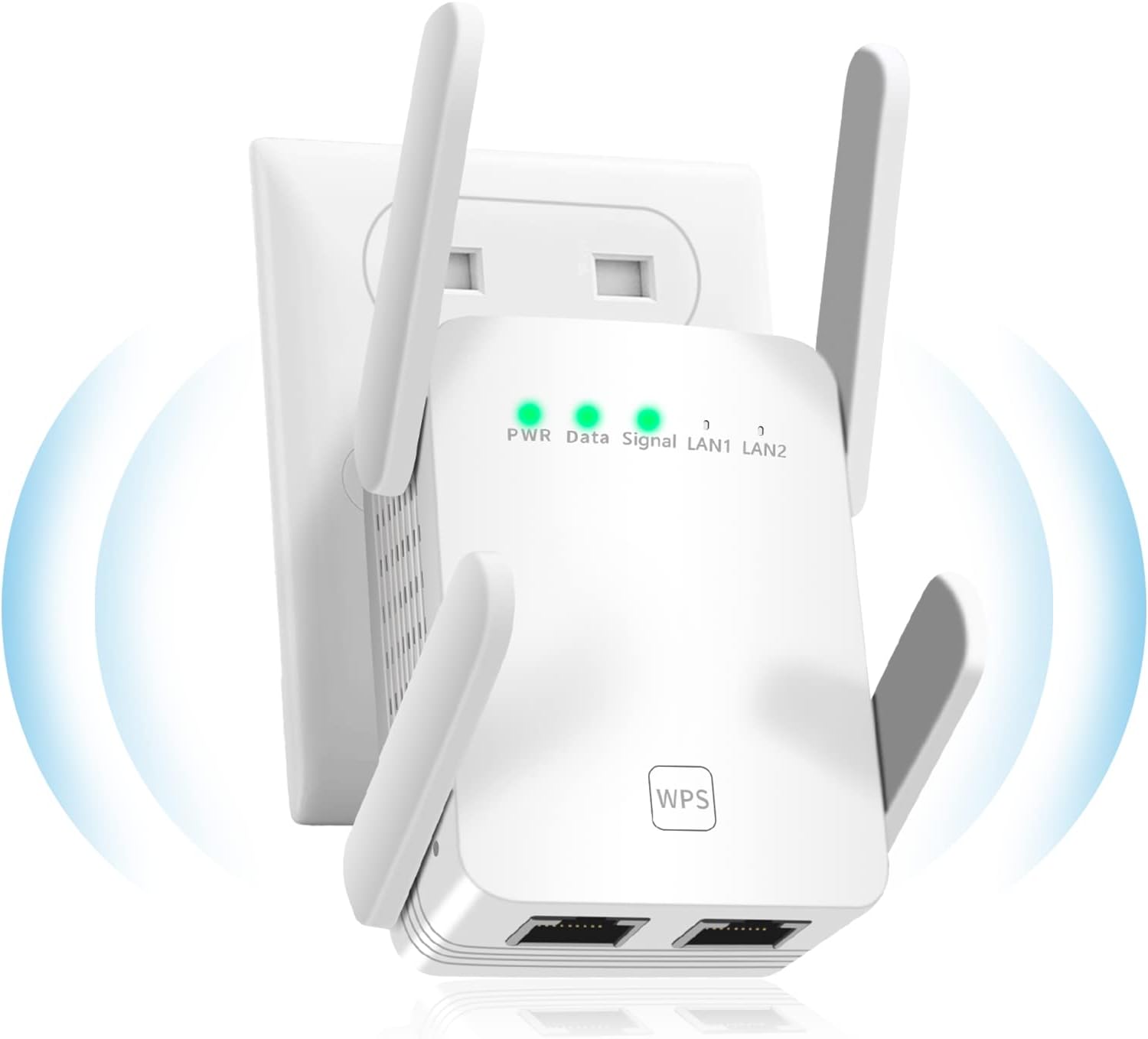
How I solved the problem: I added a tiny WLAN repeater with LAN next to the OpenSprinkler and connected the OpenSprinkler via LAN to the repeater.
https://www.amazon.de/dp/B0GYX9FRW8?ref=ppx_yo2ov_dt_b_fed_asin_titleThat solved it for me and it is running now for over a weak without going offline.
Attachments:
August 11, 2026 at 5:14 am #87284 -
AuthorPosts


- You must be logged in to reply to this topic.
OpenSprinkler › Forums › OpenSprinkler Unified Firmware › OpenSprinkler Drops WiFi Regularly