OpenSprinkler › Forums › OpenSprinkler Unified Firmware › Weather Underground Issue with Weather Service v3.0.2, Firmware Version 2.2.1(3)
- This topic has 9 replies, 2 voices, and was last updated 1 year ago by
Ray.
-
AuthorPosts
-
September 20, 2025 at 5:22 am #83752
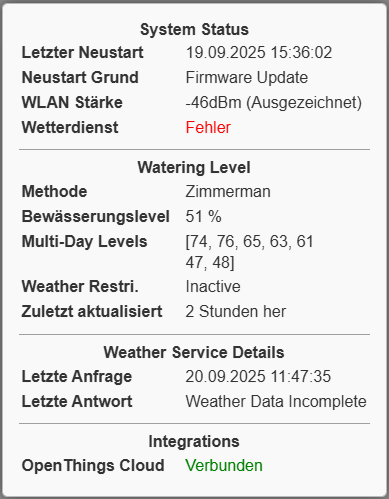
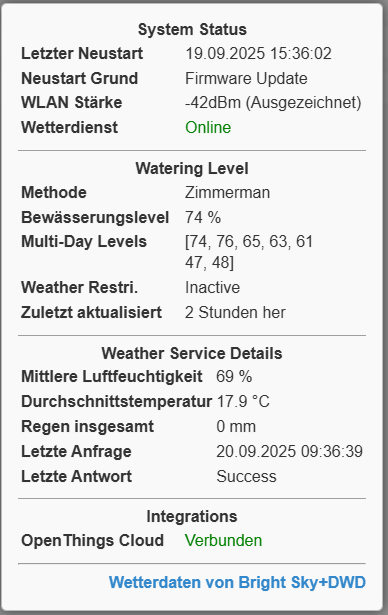
franzsteinParticipantAs you can see in the attached screenshots, I receive an “Weather Data Incomplete” error if switching to Weather Underground. There is no problem if I’m using for exsample DWD as weather provider.
However, sending the folowing request to the weather service:
http://weather.opensprinkler.com/weather1.py?loc=49.47432,10.94365&wto=”h”:100,”t”:100,”r”:100,”bh”:65,”bt”:70,”br”:0,”pws”:”IFRTH65″,”key”:”my_api-key”
results in:
&scale=75&tz=56&sunrise=420&sunset=1161&eip=1469121255&rawData={“wp”:”Apple”,”h”:69.58,”p”:0,”t”:64.9}&errCode=0&scales=[75,74,63,60,53,37,38,32,31,29]&ttl=43422990
which looks a little bit strange as “Apple” ir returned as weather provider!
Any help would be appreciated.
September 20, 2025 at 7:07 am #83755
RayKeymasterYour query does not have the “provider” parameter anywhere, it would not know you want to use WU (WeatherUnderground) as the provider. You will need to include
"provider":"WU"inwtoSeptember 20, 2025 at 11:45 am #83758
franzsteinParticipantUnderstand! However, if I change the request to:
http://weather.opensprinkler.com/weather1.py?loc=49.47432,10.94365&wto=”h”:100,”t”:100,”r”:100,”bh”:65,”bt”:70,”br”:0,”provider”:”WU”,”pws”:”IFRTH65″,”key”:”my_api-key”
it results in:
&errCode=11&scale=100
Which indicates the “Weather Data Incomplete” error, as decribed on top of the post.
Any ideas what I made wrong?
September 20, 2025 at 1:58 pm #83760
RayKeymasterThis weather station (IFRTH65) seems to return
nullfor precipitation, which is what’s causing the error.September 20, 2025 at 3:15 pm #83761
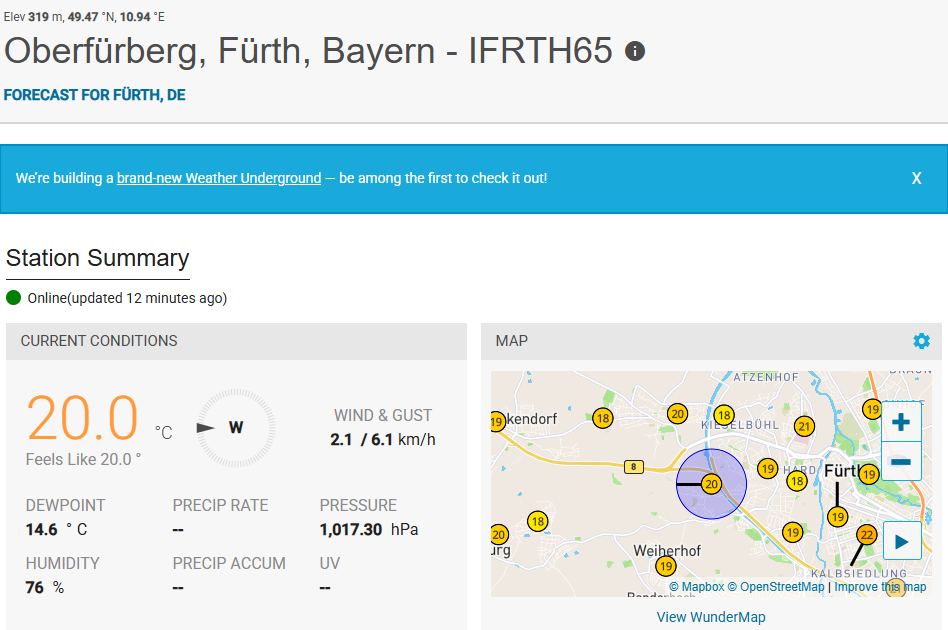
franzsteinParticipantOk. But I don’T see any chance to change this. This is Weather Underground specific. You casn see this in the attached screenshot below. There will be rain forecasted for Tomorrow or on Monday. Let’s see what happend then?
This may be a general issue if using WU. It didn’t cause any problems before the Weather Service v3.0.2 update. Is there a possibility to fix this problem within the Weather Service script?
Attachments:
September 20, 2025 at 3:48 pm #83763
RayKeymasterIf the weather station doesn’t report rain at all (return null), previous versions likely just ignored it and replaced it by 0. But this kind of silent dropping invalid data is problematic because the root cause is the weather station is missing a necessary data field. Why not find a nearby weather station that does report rain data. Forecast is not the same as historic data as the weather adjustment methods like Zimmerman and ETo require historic data, not forecast data.
September 20, 2025 at 6:13 pm #83765
RayKeymasterI just went on wunderground.com, put in your location and there are a lot of other weather stations near your GPS location. For example:
IFRTH187
IFRTH239
IZIRND20
all report valid precipitation data.September 21, 2025 at 3:22 am #83770
franzsteinParticipantI see your point about the invalid data. As you mentioned, I’ve also tried “IFRTH239”. This is a perfect workaround, and it works.
However, I like to use my own Netatmo weather station as reference. The main reason for it is that rain falls sometimes very locally. I like to have this measured by my own rain sensor.
Let me explain a little bit more. Netatmo weather stations can’t be directly connected to Weather Underground anymore. The partnership between Netatmo and Weather Underground was finished 2018. For this reason, I’ve used the Meteoware Service to populate the weather data to Weather Underground. I think this causes the issue with the weather station not reporting rain at all (return null).
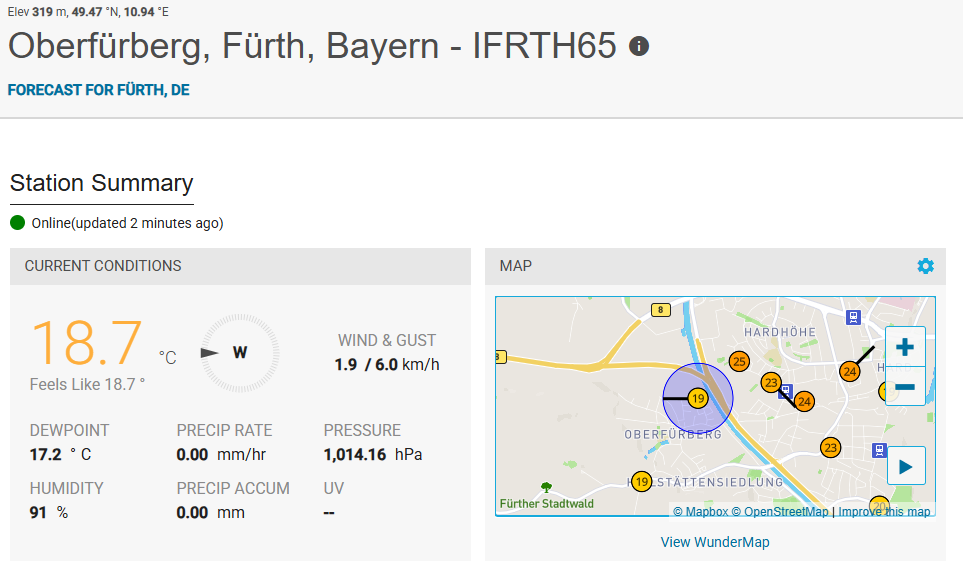
As I’m running WeeWx on a Raspberry Pi I have substituted the Meteoware Service by WeeWx to forward the data to Weather Underground. As you can see in the screenshot below, the precipitation is now rated as 0.00 mm. However, Netatmo does not provide any UV sensors, and this value is still undefined. From my understanding this should be Ok for using the Zimmerman method.
Nevertheless, I still have the problem with incomplete data selecting “IFRTH65”. Do I have to wait a certain amount of time before using “IFRTH65”. Please have a look at this issue.
Attachments:
September 27, 2025 at 12:37 pm #83835
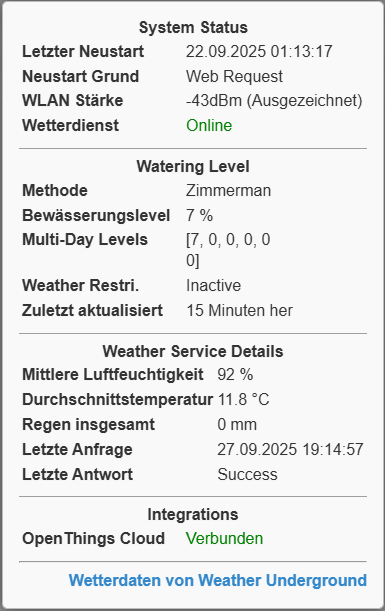
franzsteinParticipantI found the answer while looking at the https request used by the OpenSrinkler Weather Service:
https://api.weather.com/v2/pws/observations/hourly/7day?stationId=IFRTH65&format=json&units=e&numericPrecision=decimal&apiKey=”my_api_key”.
In case of any new setup referencing your own PWS, you must wait worst case 7 days to get valid historic data. After this time the Watering Level will be calculated as expected.Attachments:
September 27, 2025 at 6:51 pm #83840 -
AuthorPosts


- You must be logged in to reply to this topic.
OpenSprinkler › Forums › OpenSprinkler Unified Firmware › Weather Underground Issue with Weather Service v3.0.2, Firmware Version 2.2.1(3)