About a month ago, we introduced AC-powered OpenSprinkler v4, the first OpenSprinkler built on ESP32, and opened pre-orders with shipments expected in late September. Today I’m happy to announce that OpenSprinkler v4 is officially shipping, and every unit comes with the newly released Firmware 2.2.1(6).
This firmware not only supports the new hardware, it also brings several new features, available for all of OpenSprinkler v3, v4, and OpenSprinkler Pi (OSPi).
TL;DR — What’s New in Firmware 2.2.1(6)?
- OpenSprinkler v4 support – The unified firmware now runs on the ESP32-C6-based v4, along with v3 and OSPi.
- Bundle Stations – A Bundle Station groups a set of zones so they run together as if physically wired together, with staggered activation. This makes it easier to run valves in parallel while scheduling multiple bundles in sequence.
- Weather Sensor – Weather data becomes a sensor reading, which means you can design your own weather-based adjustment, and even use a different one for each program.
- Bounded Sprinkler Logs – Logs now live in a fixed-size storage area and can no longer fill up the controller’s flash memory.
- One-Click Firmware Update – The controller finds the correct firmware for your hardware, verifies it, and installs it, with no manual download needed.
Bundle Stations
OpenSprinkler has long been able to run zones one after another (sequentially) or at the same time (in parallel). What it could not do gracefully is a combination of the two: run a set of zones together, and then another set after that.
Take a simple example. Let’s say Zones 1 and 2 should run together, and 3 and 4 should run together after them. There have been two ways to approximate this. With Sequential Groups, you could put zones 1 and 3 in one group, and 2 and 4 in another. That works, but only if the paired zones happen to have exactly the same run time. Change one duration, or add a third zone to each set, and the arrangement falls apart.
Alternatively, you could use multiple programs: zones 1 and 2 in one program, and 3 and 4 in another, with the second program’s start time set carefully so it begins right after the first one ends. That becomes impractical for more complex runs, since every change to a run time means recalculating the start times of the programs that follow, and it can quickly use up the available programs.
A Bundle Station solves this directly. You pick one zone as the leader and select the zones that should run with it, its members. Whenever the leader runs, its members run too. In the example above, zone 1 leads a bundle containing zone 2, and zone 3 leads a bundle containing zone 4. Put zones 1 and 3 in the same Sequential Group, and the two pairs take turns, while the zones within each pair run together.
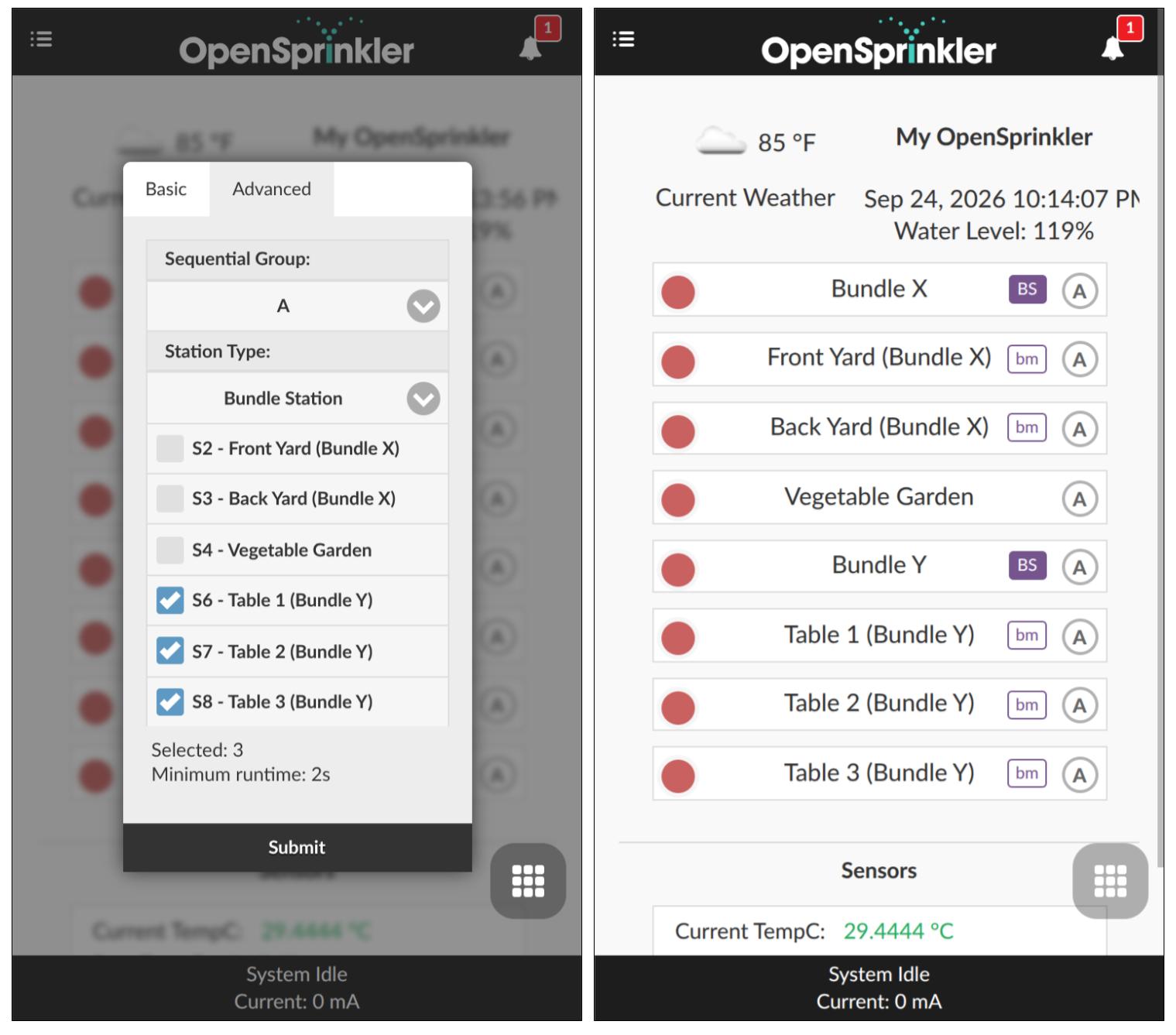
Bundles are also quite flexible. A member can still be run on its own, just like any other zone. A zone can belong to more than one bundle, and it stays on as long as any active bundle still needs it. In the app, leaders are marked with a BS badge and members with a bm badge, so the relationships are easy to see at a glance. To keep things tidy, only the leader appears in program preview, logs, and notifications. For now, bundle members must be Standard zones (not special stations or master zones), and every member’s Use Master attributes are observed when activated via a bundle leader.
A Word of Caution: now that running multiple zones in parallel is even easier, please don’t go too far with it. Each open valve draws significant current for as long as it is on, and neither your transformer nor the controller’s circuitry is designed for a large number of valves at once. The firmware automatically staggers the valves and turns them on one at a time, 250 ms apart, to soften the inrush current. But the total current can still be large. Parallel valves also share the same water supply, so pressure may drop. We recommend that each bundle contain no more than three members, for a total of four valves including the bundle leader. If you need more than that, check your transformer’s rating and your water supply first.
Weather Sensor
OpenSprinkler has offered weather-based adjustment for many years, through built-in methods such as Zimmerman and ETo. They work well, but they are fixed recipes: you can tune a few parameters, but you cannot change how the formula itself works.
Firmware 2.2.1(5) introduced sensor-based program adjustment, along with the Sensor Expander. Weather Sensor, new in 2.2.1(6), connects the two ideas. It turns weather data, such as current conditions, today’s forecast, yesterday’s temperature, humidity, and rainfall, and reference evapotranspiration (ETo), into sensor readings on your controller. It requires no additional hardware. Like any other sensor, a Weather Sensor can be charted, logged, and used to adjust a program’s watering time.
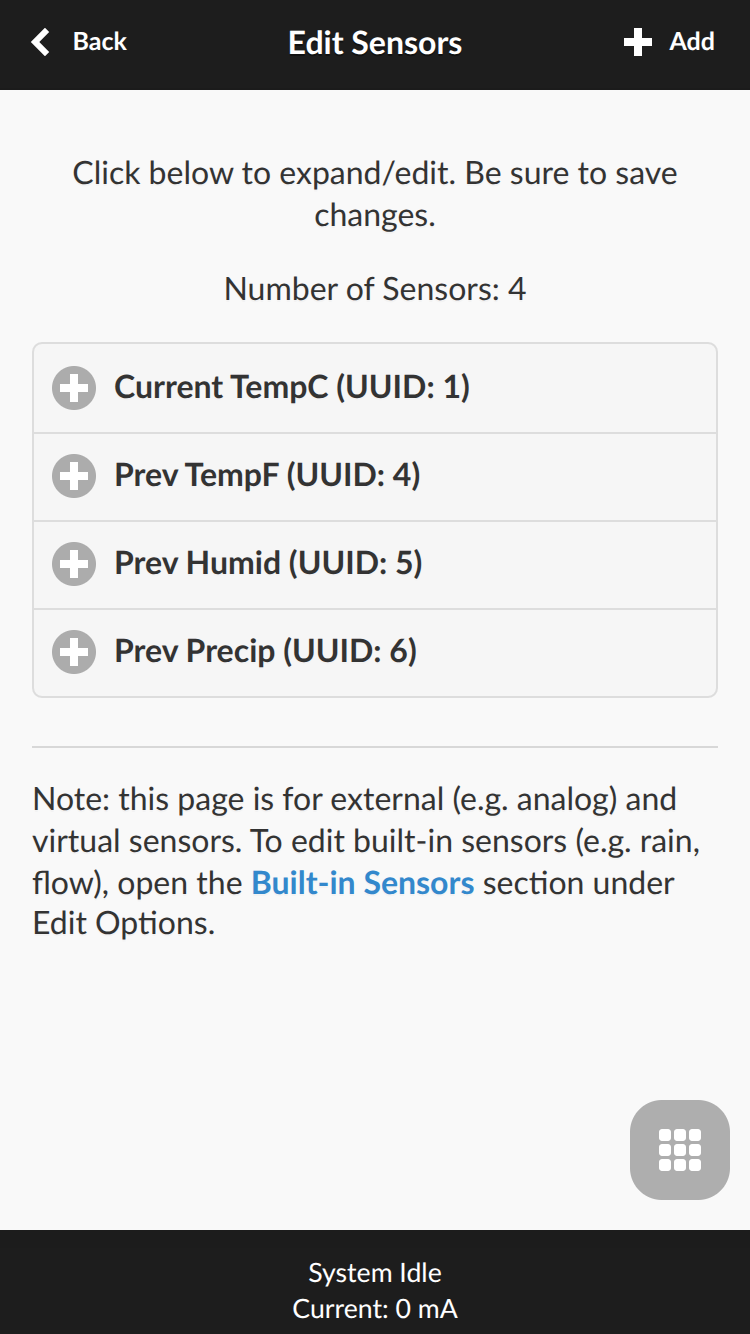
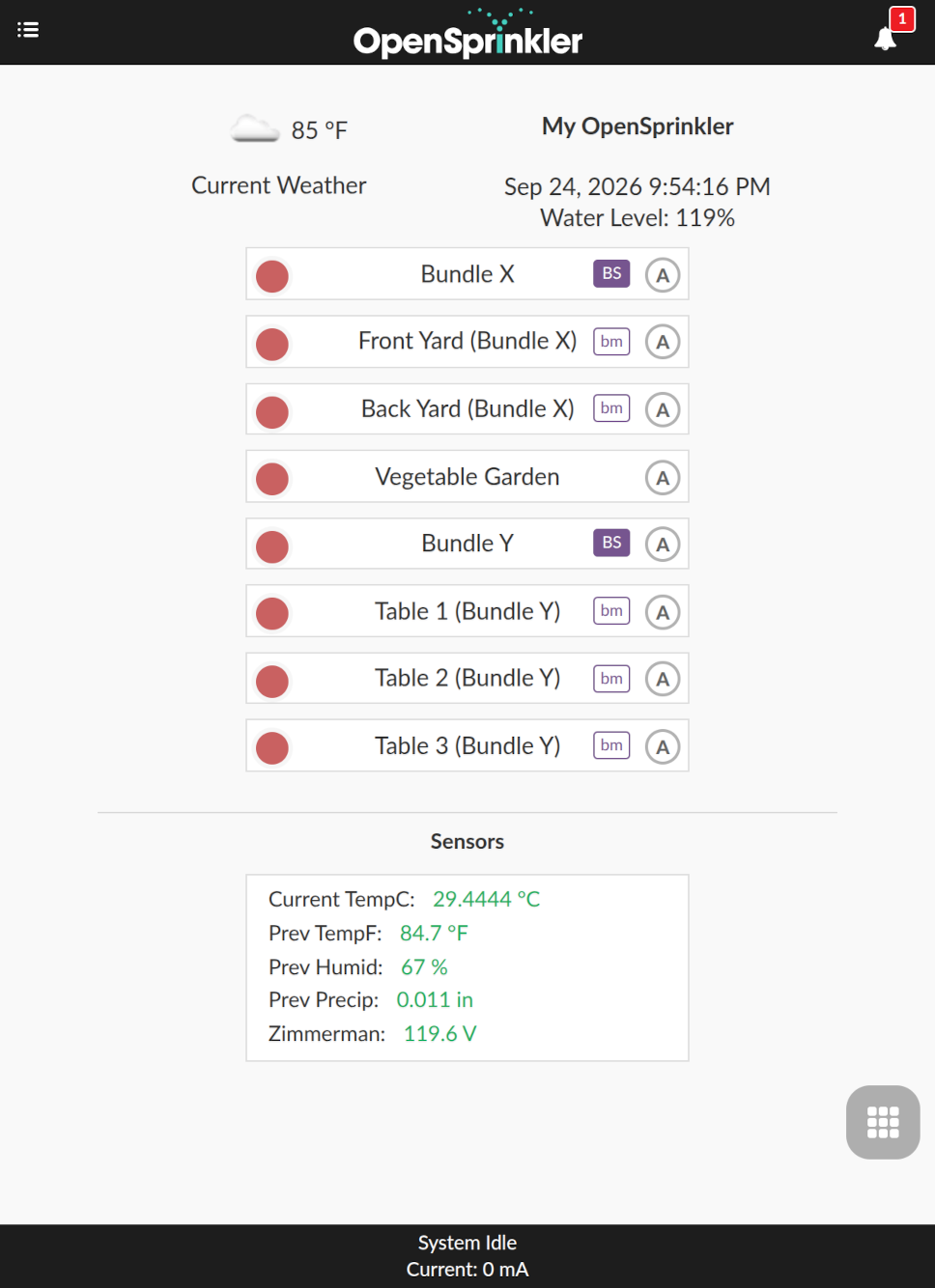
Things get more interesting when you combine several Weather Sensors with an Aggregate Sensor, which combines multiple sensors into a single value. With the two together, you can essentially write your own weather-adjustment formula.
As a quick demonstration, let’s make a Zimmerman-style adjustment using the previous day’s weather. We can use this formula as a starting point:
watering % = 100 + (T − 70) × 4 + (30 − H) − 200 × Pwhere T is the temperature in °F, H is the humidity in %, and P is the precipitation in inches. Each term is a reading multiplied by a constant, plus a constant. That is exactly what an Aggregate Sensor can express: each of its children has its own individual Scale and Offset, and its value is computed as reading × Scale + Offset before the children are combined.
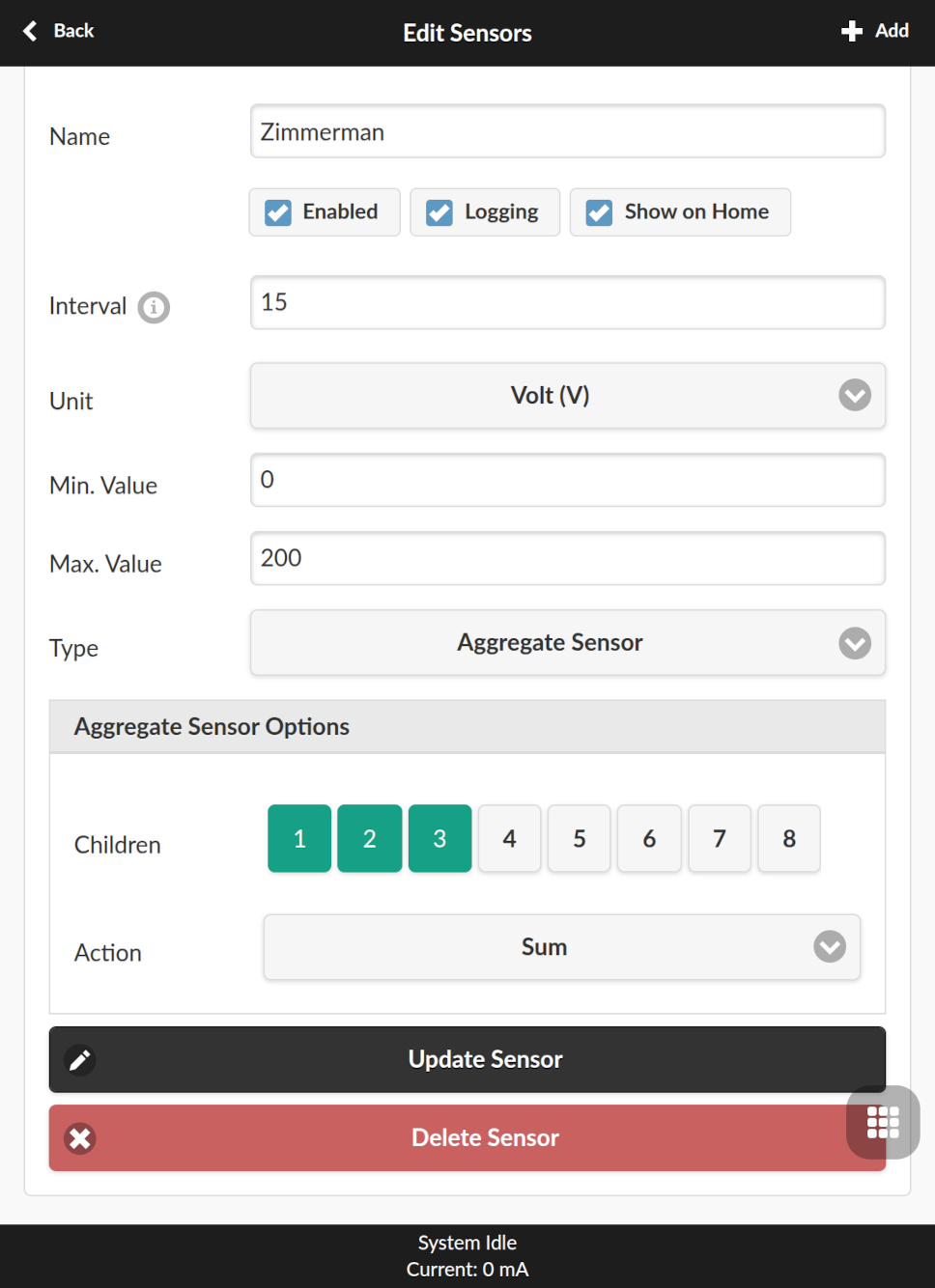
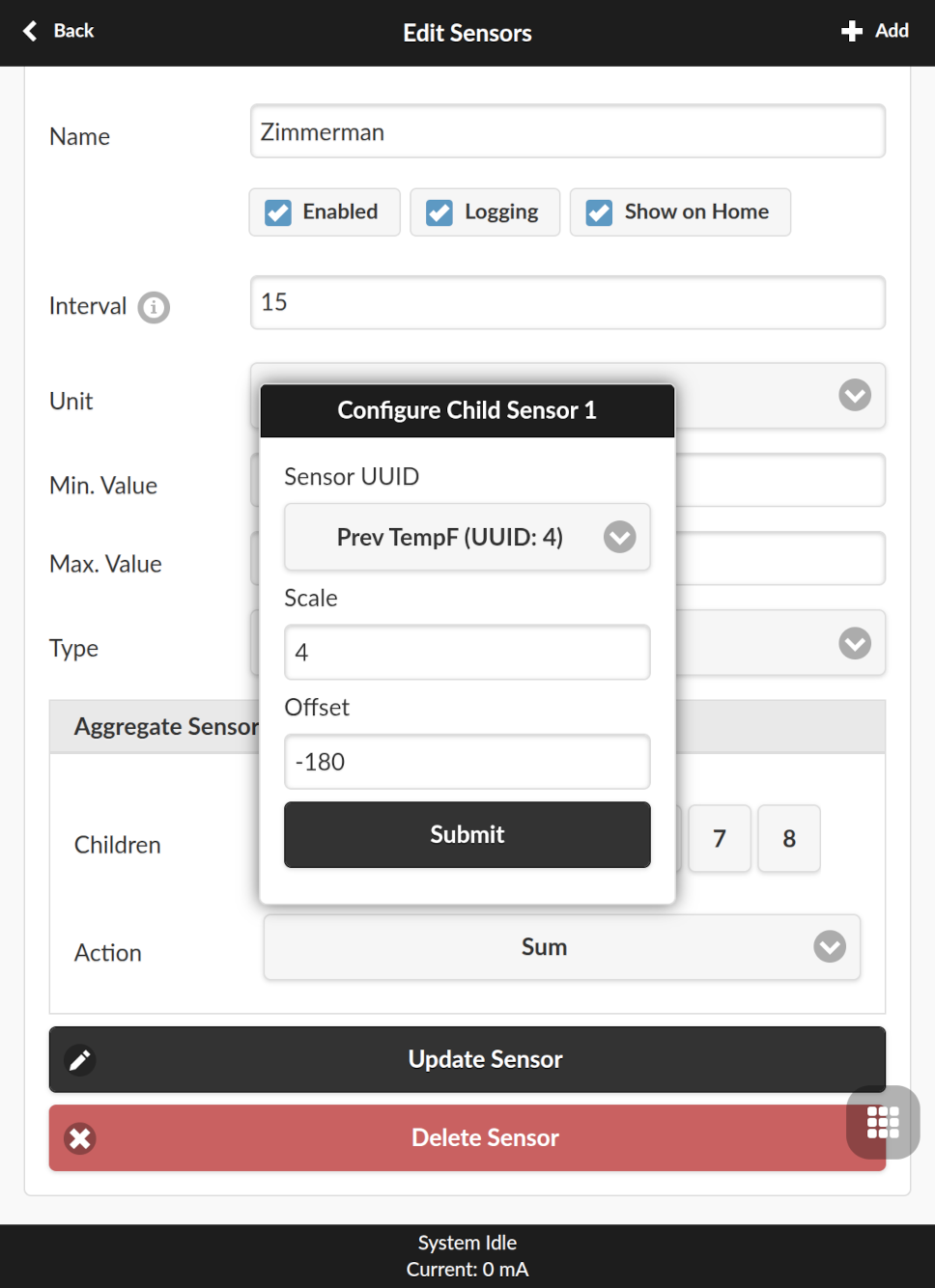
To build this example:
- Create three Weather Sensors: Previous Day Temperature, Previous Day Humidity, and Previous Day Precipitation. Keep their default units (°F and inches), since the constants below are based on them.
- Create an Aggregate Sensor, set its Action to Sum, and add the three Weather Sensors as children with the following parameters:
| Child | Scale | Offset | Resulting Term |
| Previous Day Temp. | 4 | -180 | 4T − 180i.e. 100 + (T−70)×4 |
| Previous Day Humidity | -1 | 30 | 30 - H |
| Previous Day Precip. | -200 | 0 | −200 × |
- Set the Aggregate Sensor’s Min. Value to
0and Max. Value to200. Its output is now a watering percentage limited to 0–200%. (The constant 100 is folded into the temperature child’s offset, as−280 + 100 = −180. Be sure to change Min and Max, because the defaults would clamp the output to 0–5.) - In the program’s sensor adjustment, select the Aggregate Sensor and define a straight-line curve with two points:
0 → 0%and200 → 200%.
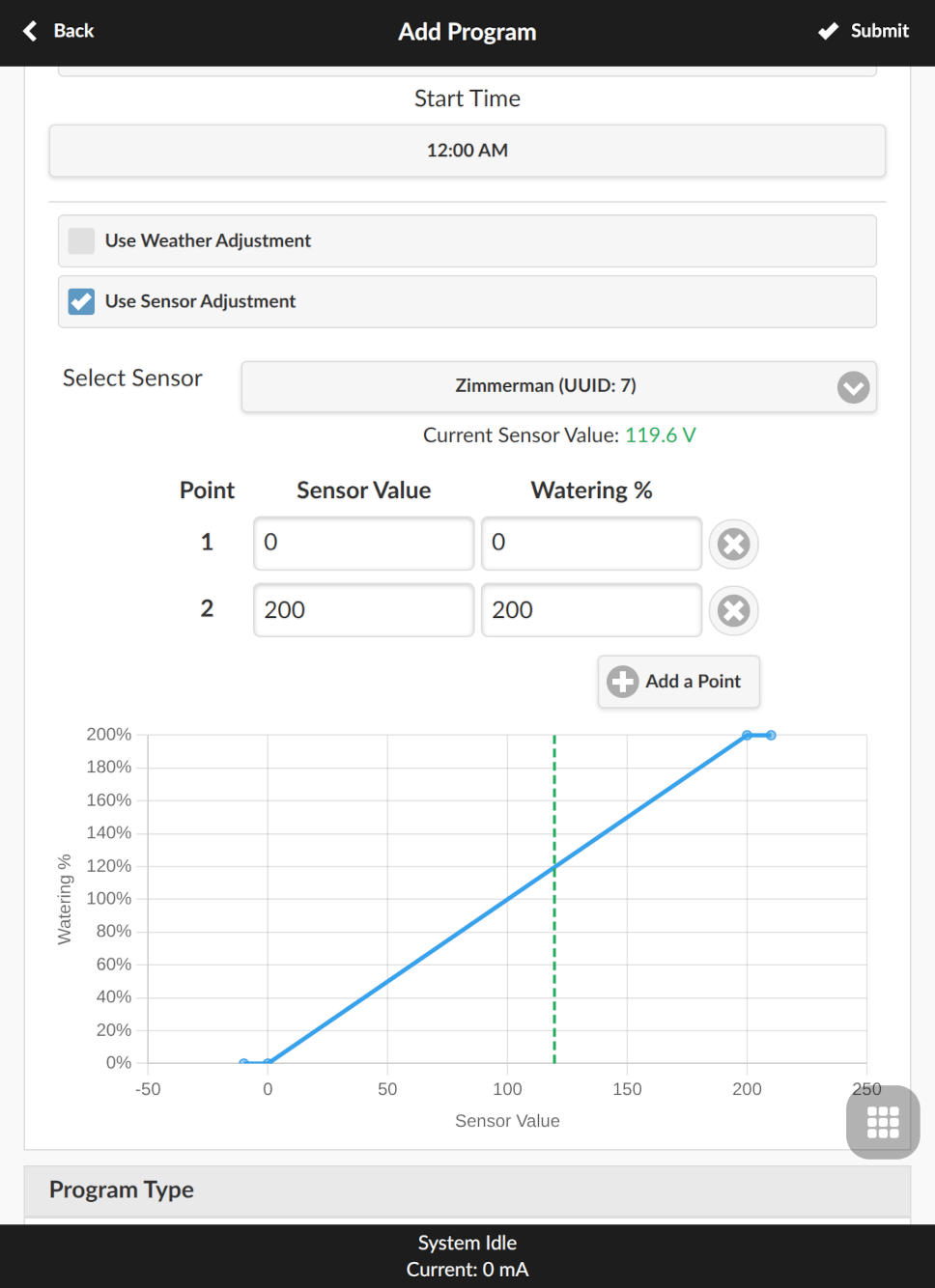
The built-in Zimmerman method also lets you weight each factor. The same is possible here: multiply that child’s Scale and Offset by the weight. For example, to count humidity at 50%, set its Scale to −0.5 and Offset to 15. (For the temperature child, apply the weight before adding the 100: at 50%, the Scale becomes 2 and the Offset −140 + 100 = −40.)
This Zimmerman-style example is only a starting point. Because each program has its own sensor adjustment, you can give each program its own formula. A lawn might respond strongly to heat, while drip-irrigated shrubs barely need to change. The built-in methods apply one setting to the whole controller; with Weather Sensor, that choice is now yours to make per program.
One thing to keep in mind: sensor adjustment is multiplied with the regular weather adjustment, so if you use your own formula, turn off the regular weather adjustment for that program to avoid counting the weather twice.
Bounded Sprinkler Logs
This change has a less pleasant backstory. After Firmware 2.2.1(5) was released, a few users reported that they could no longer save changes to their zone names or programs. The culprit turned out to be sprinkler logs. The old firmware wrote a new log file every day, and those files were never limited in size. On controllers that had been running for years, the logs had gradually filled up the flash memory, leaving no room to save anything else. Worse, the firmware did not always report the failed save, so the app appeared to accept the change. The fix was to clear the sprinkler logs.
Firmware 2.2.1(6) fixes this at the root. Sprinkler logs are now stored in a compact, fixed-size area that holds roughly 51,000 records on v3 and v4. Once it is full, the oldest records are replaced by new ones, so the logs can never again crowd out your settings. This mirrors how Expanded Sensor Logs, introduced in 2.2.1(5), have been managed from the start: they are also stored in a bounded space that rotates out the oldest records. The log view in the app works just as before, and downloading a large amount of log data is faster. In addition, when a save does fail for any reason, the firmware now reports the error instead of silently claiming success.
Important for v3 users: the first time your controller boots into 2.2.1(6), it deletes the sprinkler logs written by earlier firmware to reclaim that space. If you want to keep your watering history, please download your logs before upgrading. The cleanup can make the first boot take a little longer; the LCD shows its progress, so please keep the controller powered until it finishes. On OSPi, old log files are left on disk but no longer appear in the app. A new v4 has no logs in the legacy format, so this does not apply.
One-Click Firmware Update
Because v4 uses a different microcontroller, it needs a different firmware binary from v3. Automatic firmware download and flashing would be necessary to avoid confusion. Firmware 2.2.1(6) delivers on that.
Until now, updating firmware meant visiting the release page, figuring out which file matched your hardware, downloading it, and uploading it to the controller. It is not hard, but it is easy to get wrong. With two hardware families it’s even more error-prone. The new One-Click Firmware Update takes care of all of this. The controller checks the official release list, offers only firmware that matches your hardware, and verifies the image before installing it. Manual upload is still available if you ever need it.
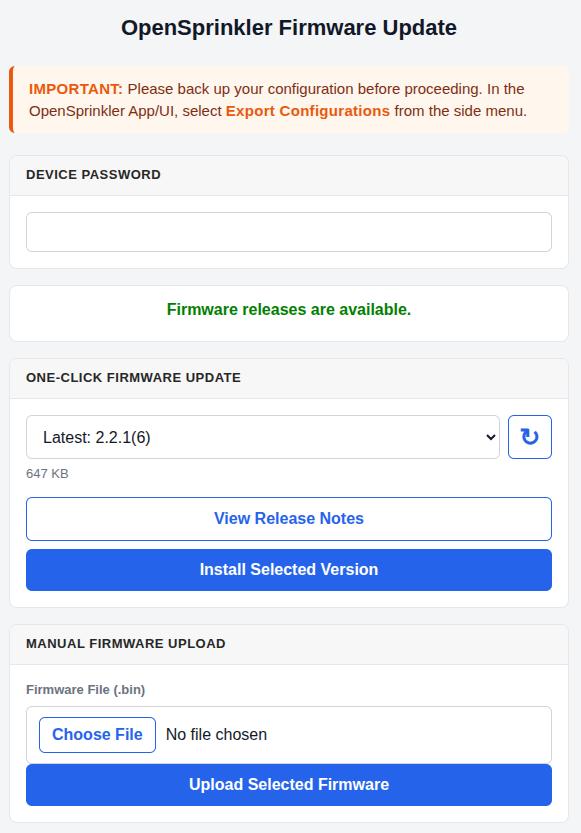
One-click update is available on OpenSprinkler v3 and v4 (OSPi continues to update directly on the Raspberry Pi). It requires a local connection to the controller, so it will not work over remote OTC access. And since the feature is new in this release, the update to 2.2.1(6) still has to be done manually. From then on, future updates are a single click away. The Firmware Update Instructions cover both methods.
What Else is New in Firmware 2.2.1(6)?
- More reliable wired Ethernet – The W5500 wired Ethernet driver on v3 has been strengthened, with better diagnostics and automatic recovery from faults.
- Safer weather fallback – If automatic weather adjustment receives no successful update for 24 hours, watering returns to 100% instead of holding on to an outdated value.
- MQTT improvements – MQTT commands are now validated the same way as commands from the app, and the controller re-subscribes automatically after a disconnect. See the MQTT guide for details.
- Bug fixes – Timed pauses now expire correctly, and flow-rate calculations and flow alerts have been corrected.
Questions You May Have
Q: Do I need an OpenSprinkler v4 to use these new features?
A: No. Bundle Stations, Weather Sensor, bounded logs, and One-Click Firmware Update are all available on v3 as well. Bundle Stations, Weather Sensor, and bounded logs are also available on OSPi.
Q: Will upgrading erase my programs and settings?
A: No. Like other build-number updates, upgrading to 2.2.1(6) keeps your settings and programs. On v3, however, old sprinkler logs are deleted on the first boot, as described above. As always, we recommend exporting a backup of your configuration before upgrading.
Q: Which version of the app do I need?
A: To see the Bundle Station and Weather Sensor settings, use OpenSprinkler App 2.4.104 or later, or the web interface hosted on the controller.
Q: Can I update through OpenThings Cloud (OTC)?
A: No. Firmware updates, both one-click and manual, require a local connection to the controller.
Q: How many zones can I put in a bundle?
A: The firmware does not set a practical limit, but your power supply and water supply do. We recommend no more than three members per bundle, for a total of four valves including the bundle leader.
Where to Get Everything?
- OpenSprinkler v4: Available from the OpenSprinkler Online Store.
- Firmware 2.2.1(6): See the Firmware Update Instructions.
- Documentation:
- Firmware 2.2.1(6) User Manual
- Firmware 2.2.1(6) API Doc
- Sensor Expander User Manual (covers Weather Sensor and Aggregate Sensor)
- GitHub Release Notes
Finally, a big thank you to everyone who pre-ordered OpenSprinkler v4 and waited patiently for it to ship. We hope you like it!