OpenSprinkler › Forums › OpenSprinkler Unified Firmware › Missing weather
- This topic has 7 replies, 3 voices, and was last updated 4 months, 2 weeks ago by
Tamar Cohen.
-
AuthorPosts
-
May 8, 2026 at 3:30 am #85741
DatamonkeyParticipantI been noticing my weather has not been showing up. Never had it do this before. Wondering what I’m doing wrong/were to start trouble shooting.
My setup is:
Hardware: OSPi on a RPi B+
App Version: 2.4.90
Firmware: 2.2.1 (4)
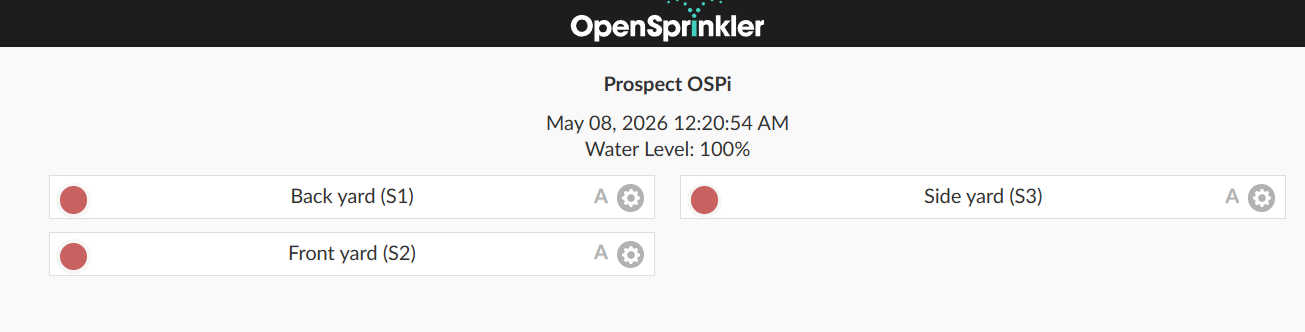
I am pulling weather data from Wunderground form my personnel station.For about the last 3 weeks the weather has not been showing on ether my Android phone or Win11 PC. See Win screen shot.
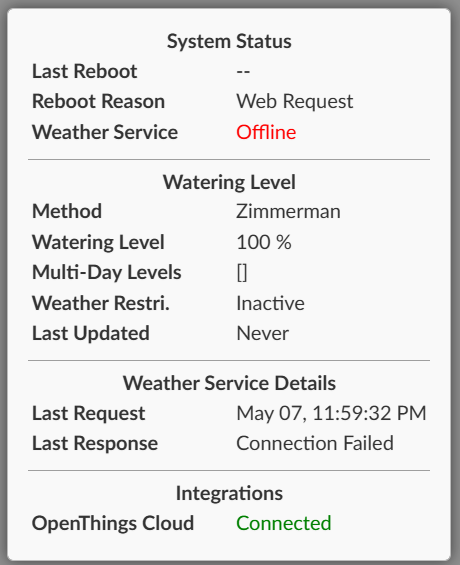
Also, the system status is showing that weather service is offline and the connection has failed. See System stat screen shot.
It validates the API key from WU and I know my station is reporting.
Sprinklers still run and such but just trying to figure what I did as it all looks good.
Thanx in advance for in help.Attachments:
May 8, 2026 at 9:29 am #85747
RayKeymasterCan you submit a support ticket at:
support.opensprinkler.com
attaching a copy of your configruations?One plausible reason, particularly if you are using your own weather server, is that firmware 2.2.1(4) by default uses HTTPs (secure HTTP) for weather server. If you you launched your own weather service and it’s not HTTPs, you should explicitly included http:// in the weather server url. This is evident in the firmware code:
https://github.com/OpenSprinkler/OpenSprinkler-Firmware/blob/master/weather.cpp#L196May 11, 2026 at 2:53 am #85799
DatamonkeyParticipantDone.
Was not sure what to put in the order number as I bought my hardware in June of 2013.
Not sure how you are defining “own weather server”.
I have a weather station on my property that I send data to Wunderground. I make that publicly available and use the Wunderground API key to let the OSPI use that for its weather. From what I can see and know about the API it’s HTTPS.
But I been wrong about stuff in the past so I still could be doing something to screw it all up.May 11, 2026 at 10:09 am #85802
RayKeymasterAfter examining your configuration, the most likely cause is this: using Wunderground as provider requires the location to be a specific PWS weather station. You need to select one of the blue dots, per instructions on this page:
https://openthings.freshdesk.com/support/solutions/articles/5000017485-using-weather-underground-wu-May 12, 2026 at 12:48 am #85818
DatamonkeyParticipantIt was the blue button on the map. It is slightly off from my actual house, so I moved it in the map not realizing it matches that with the API key. Once I clicked the blue station (and my stations name) it all worked.
Thank you for the help correcting my ignorance.June 7, 2026 at 10:57 am #86277
Tamar CohenParticipantI have the same issue — but I don’t see where to select the blue dot. Edit Options –> Location in the System block only lets me put in lat/long coordinates. I can’t find any other location options. When I export my configuration there is no “pws” in the json. Thanks for any guidance.
June 7, 2026 at 4:04 pm #86285
RayKeymasterIt sounds like you were clicking on the pen icon on the location bar. Can you try to click the location bar itself? It should bring up a map.
June 7, 2026 at 6:25 pm #86286
Tamar CohenParticipantAh! That’s subtle. Yes, if I click the location bar a map comes up. However there are no blue dots? I have Weather Underground selected with my API key verified. Thanks.
-
AuthorPosts



- You must be logged in to reply to this topic.
OpenSprinkler › Forums › OpenSprinkler Unified Firmware › Missing weather