We’re releasing two firmware updates together: OpenSprinkler 2.2.1(7) and OpenGarage 1.2.6. The two products share much of their underlying design, so a feature built for one often makes its way to the other. Here is what’s new.
OpenSprinkler Firmware 2.2.1(7)
Firmware 2.2.1(7) is now available for OpenSprinkler v3, v4 and OpenSprinkler Pi. This release adds one of the most requested watering features, lets v4 read analog sensors without extra hardware, broadens wired Ethernet support, and makes your controller easier to find on your network.
Cycle and Soak
If you have clay soil, a slope, or sprinklers that put down water faster than the ground can absorb it, you have probably seen the result: puddles, runoff onto the sidewalk, and water you paid for flowing down the street. The fix is to water in short bursts with breaks in between, so each round has time to soak in before the next one starts.
This is called Cycle and Soak, and it is a standard feature on many other sprinkler controllers. It has long been missing from OpenSprinkler. Firmware 2.2.1(7) closes that gap.
You set two values for each zone:
- Maximum cycle: the longest the zone may run at one time.
- Minimum soak: the shortest break before the zone runs again.
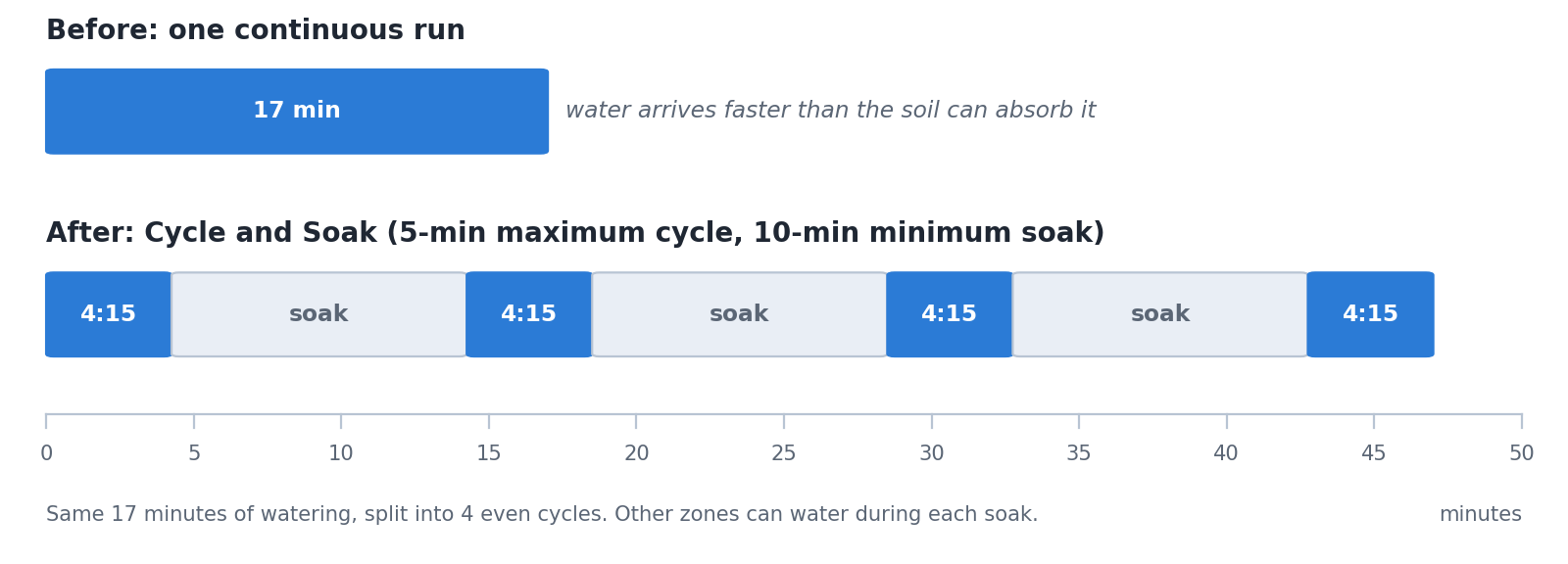
OpenSprinkler then splits the zone’s watering time into even cycles automatically. For example, 17 minutes with a 5-minute maximum cycle becomes 4 cycles of 4 minutes 15 seconds. While one zone soaks, other zones can water, helping make efficient use of the available time. Because the settings belong to each zone, your steep front bed can use short cycles while your flat back lawn waters in one go.
How is this different from Program Repeat?
OpenSprinkler has long had Repeat, which reruns an entire program at a fixed interval, such as every 45 minutes. It can roughly imitate Cycle and Soak, but it isn’t the same thing:
- Repeat works on the whole program. Every zone in the program runs again each time, with the same timing. You have to work out the split yourself. And when Weather or Sensor Adjustments scale the program, every repeat gets longer or shorter while the number of repeats stays fixed, so the split you worked out no longer fits.
- Cycle and Soak works on each zone. You set the total watering time as usual, and the firmware handles the splitting and scheduling, with different settings for different zones. The firmware recalculates the cycles after Weather or Sensor Adjustments, keeping each cycle within the maximum you set.
They also work well together. Use Repeat for when to water, for example several short sessions spread through a hot day. Use Cycle and Soak for how each zone receives its water within a session.
Cycle and Soak applies to programs and Run-Once. For a manually started zone, you can choose whether to apply it. Zones that use it show a circular-arrow indicator on the homepage.
Onboard Analog Sensors on v4
Previously, analog sensor support on OpenSprinkler v3 and v4 required the Sensor Expander. With 2.2.1(7), OpenSprinkler v4 can read analog sensors directly through its built-in sensor ports SN1–SN4. No Sensor Expander is needed. Set a port to Analog, add an Onboard Analog sensor in Edit Sensors, and you get the same features as Sensor Expander inputs:
- live readings and logging;
- built-in conversions for popular sensors such as SMT50, SMT100, VH400, THERM200 and AquaPlumb, plus linear and piecewise-linear options for others;
- automatic program adjustment based on the readings.
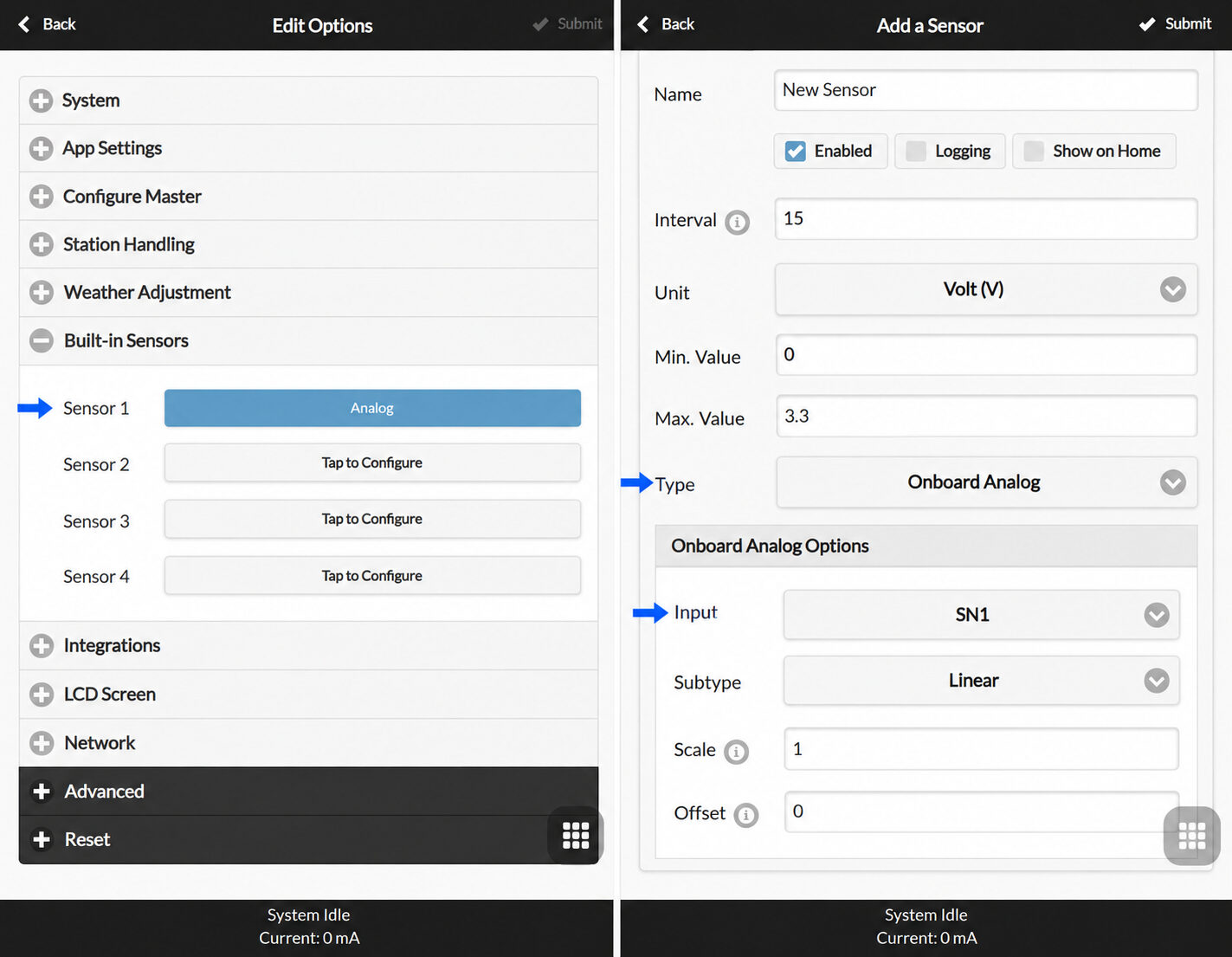
The ports read 0–3.3 V, which suits common irrigation sensors such as the SMT50 and VH400.
The Sensor Expander remains useful in these situations:
- You need many sensors. The expander provides 16 analog inputs, compared with four built-in ports.
- Your built-in ports are already in use by digital sensors, such as a rain sensor, flow meter or program switch.
- You use a v3 controller, which still needs the Sensor Expander for analog inputs.
CH390 Wired Ethernet Support
Many users prefer wired Ethernet for reliability or in locations where WiFi is weak. Until now, OpenSprinkler v3.3–3.4 and v4 supported the W5500 Ethernet module. Firmware 2.2.1(7) adds support for the CH390, a newer, smaller, lower-cost Ethernet controller. It has a simpler design and needs far fewer peripheral components than the W5500.
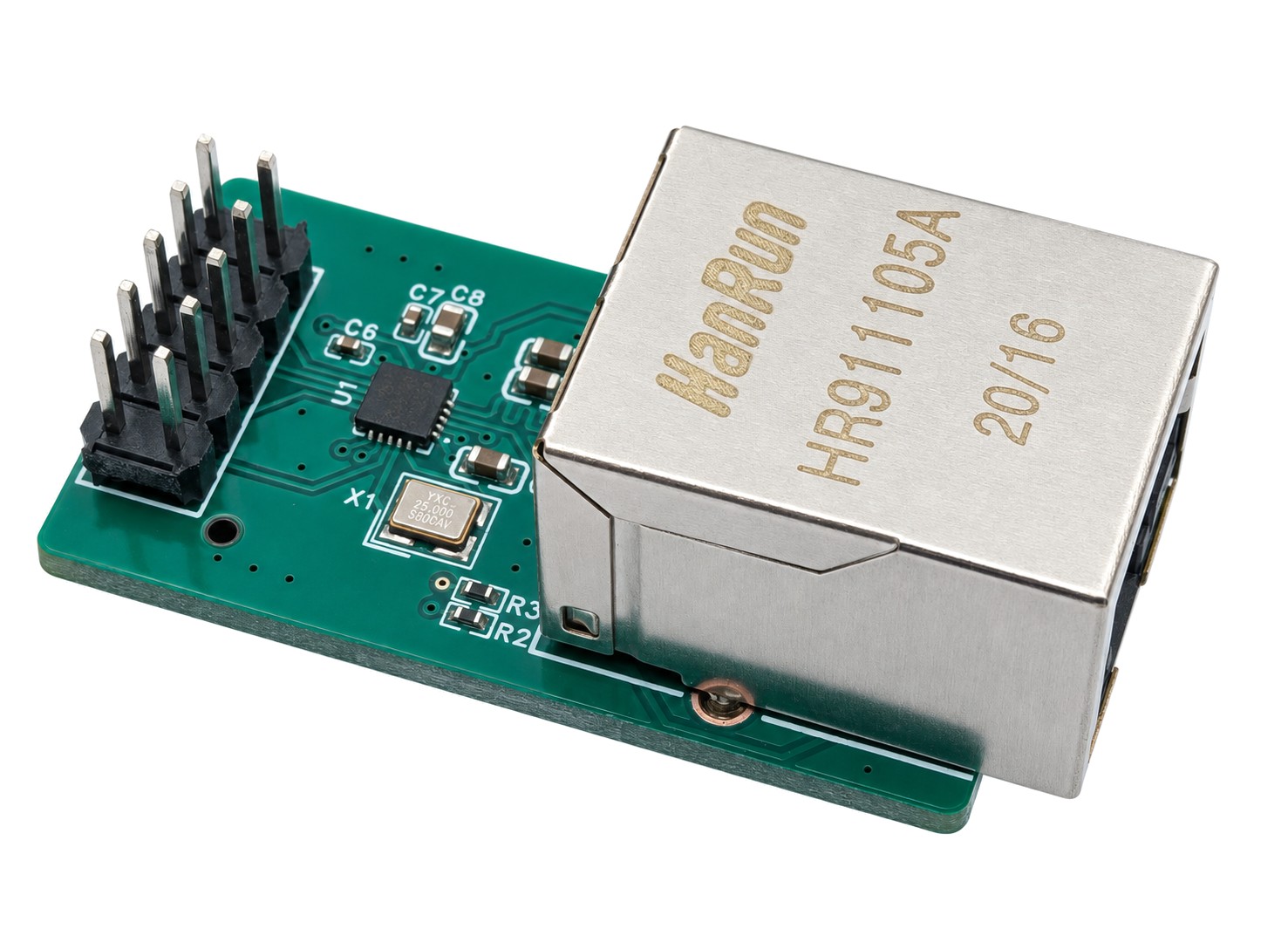
This release also improves Ethernet recovery and the automatic fallback from wired to WiFi, for all supported Ethernet modules.
Custom Hostnames
On OpenSprinkler v3 and v4, you can now give your controller an easy-to-remember hostname, such as garden-os, and open it at http://garden-os (some routers require http://garden-os.lan). This is more convenient than using its numeric IP address, which is assigned dynamically by default and can change. Set it under Edit Options → Network. If you have several controllers, giving each one a descriptive name is especially handy. If you leave it empty, the controller uses a default name based on its MAC address.
Other Improvements and Fixes
- More reliable cloud (OTC) connections and recovery after outages.
- Fixed a crash when saving programs through the cloud connection on wired v3 controllers.
- Fixed sequential zones opening together when they were queued in the same second.
- Firmware updates. The updater can now show formatted release notes.
- Chip temperature monitoring on v4 through the System Internal sensor.
- Clearer Remote Extension behavior. A controller in Remote Extension mode no longer starts automatic watering or queries weather, but still accepts commands from the main controller.
Follow the firmware update instructions and check the 2.2.1(7) release notes.
OpenGarage Firmware 1.2.6
Firmware 1.2.6 is now available for OpenGarage. It brings one-click updates and smarter WiFi for mesh networks, and keeps your garage door working when the network is down.
One-Click Firmware Updates
Following OpenSprinkler firmware 2.2.1(6), OpenGarage now gets one-click firmware updates too. Updating used to mean finding the right .bin file, downloading it and uploading it by hand. Now you open the update page, pick a release, read its release notes, and click Install Update: your browser downloads and checks the firmware, then uploads it to OpenGarage. To get this feature, update to 1.2.6 manually once. After that, future releases install directly from the update page.
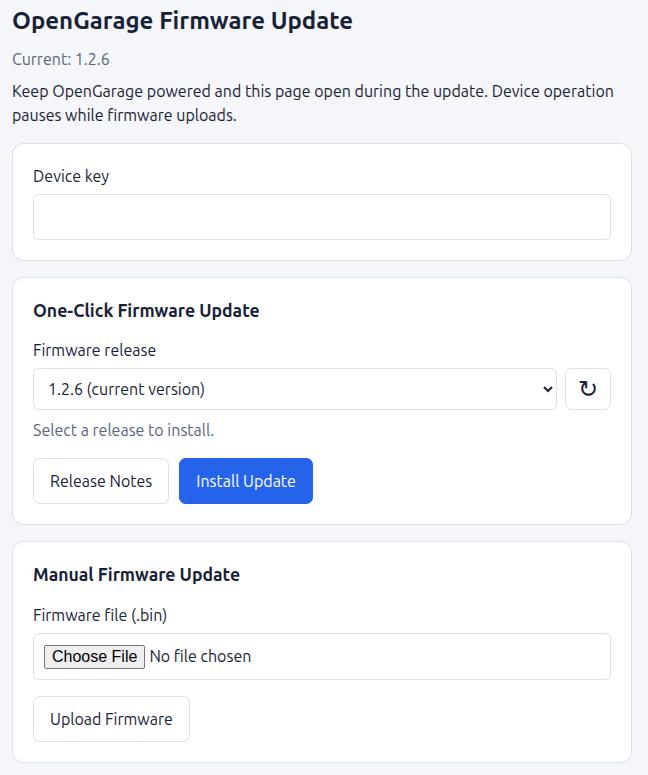
Prefer to do it yourself? Manual upload is still there, and it also works in WiFi setup (AP) mode.
Smarter WiFi for Mesh Networks
Many homes now have mesh systems or several access points sharing one network name. Older firmware could stay stuck on a distant access point with a weak signal.
1.2.6 picks the strongest access point for your network, and moves to a better one if the signal stays weak. Reconnection is smarter too: after a router reboot or outage, OpenGarage keeps retrying at sensible intervals until it’s back online.
This is on by default (Advanced → WiFi AP Selection: Automatic), and you can switch it off if you prefer. Switching it off disables AP selection and roaming, but automatic reconnection remains active. This time OpenGarage is first: we plan to bring the same improvement to OpenSprinkler in a future release.
Keeps Working When WiFi Doesn’t
Your garage door shouldn’t depend on your internet connection. In 1.2.6, OpenGarage keeps door sensing, the event log, the physical button and automation running while WiFi is down.
If you rely on auto-close to shut a door left open, it now does its job even during a WiFi or internet outage. Closing at a scheduled time also works, as long as the clock has synchronized at least once since startup.
Security Improvements
Firmware uploads are now protected: OpenGarage checks an upload for your device key before it accepts any of it.
Saved passwords, keys and cloud tokens are no longer shown in Edit Options. Leave a field blank to keep the current value, type a new value to replace it, or tick Clear to remove it.
Better Security+ Support
On Security+ 2.0, door status now shows up faster after a restart; on Security+ 1.0, the light and lock status and controls now work correctly while the safety beam is blocked.
Other Updates
- More reliable MQTT. Status reporting is more reliable, and old commands stored by the broker are no longer replayed when OpenGarage reconnects.
- Blynk is no longer supported. Blynk’s legacy app was discontinued long ago and is no longer available in app stores. Very few devices still use our Blynk server, so we’ve decided to retire the legacy service. OpenThings Cloud (OTC) provides a more complete remote-access experience: you can use your device’s built-in web interface remotely, just as you do locally, with no port forwarding needed.
Follow the firmware update instructions and check the 1.2.6 release notes.