- This topic has 2 replies, 2 voices, and was last updated 1 year, 5 months ago by
.
Viewing 3 posts - 1 through 3 (of 3 total)

Viewing 3 posts - 1 through 3 (of 3 total)
- You must be logged in to reply to this topic.
OpenSprinkler › Forums › OpenSprinkler Mobile and Web App › Station Number Display
Tagged: station name, station order
jillelaine01.
Hello,
With the ability to hide disable stations and the ability to now organize by group, I think it would be a nice feature to display somewhere the actually station number that the station occupies in the firmware. Therefore, you would not have to “show disabled” and unorganized by groups to show all stations and count down to the station if the user would like to know which station number it occupies.
The best solution I can think of is under the attribute tab where is says “Station Name:” at the top, it would rather state “Station XX Name:” where XX would be the number that that station occupies in the firmware, much like it does prior to filling out the station name. There maybe other option but this seems to me to be the least cluttered way.
Any thoughts?

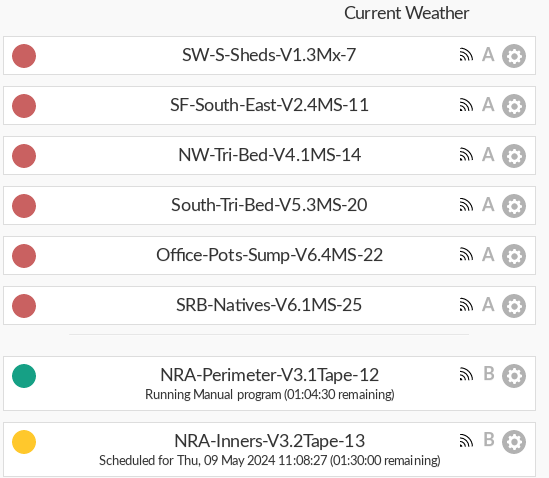
I agree that it would be good to add the station number to the station list somehow. For now, I created a station naming convention: 1) descriptive name of zone, 2) Valve box & valve number, 3) type of irrigation, 4) station number. Example: Office-Pots-Sump-V6.4MS-22 = 1) the pots near the office, 2) Valve box 6, Valve 4, 3) MS = microsprinklers, 4) original station number. I find having this much information displayed in the zone/station name is very helpful for troubleshooting and maintenance.
Now, if only the app had the option to display the station names alphabetically, and I would be deliriously happy. 🙂
Hooray! I see this feature was added as of Firmware 2.2.1(1) even though I did not see it specifically mentioned in ‘What’s New in this Firmware?’. Thank you very much for this feature. I am deliriously happy!
OpenSprinkler › Forums › OpenSprinkler Mobile and Web App › Station Number Display