OpenSprinkler › Forums › Comments, Suggestions, Requests › Wishlist and new-user experiences from an OpenSprinkler build
Tagged: RS485
- This topic has 2 replies, 2 voices, and was last updated 2 months, 3 weeks ago by
Threaded.
-
AuthorPosts
-
July 26, 2026 at 10:04 am #86980
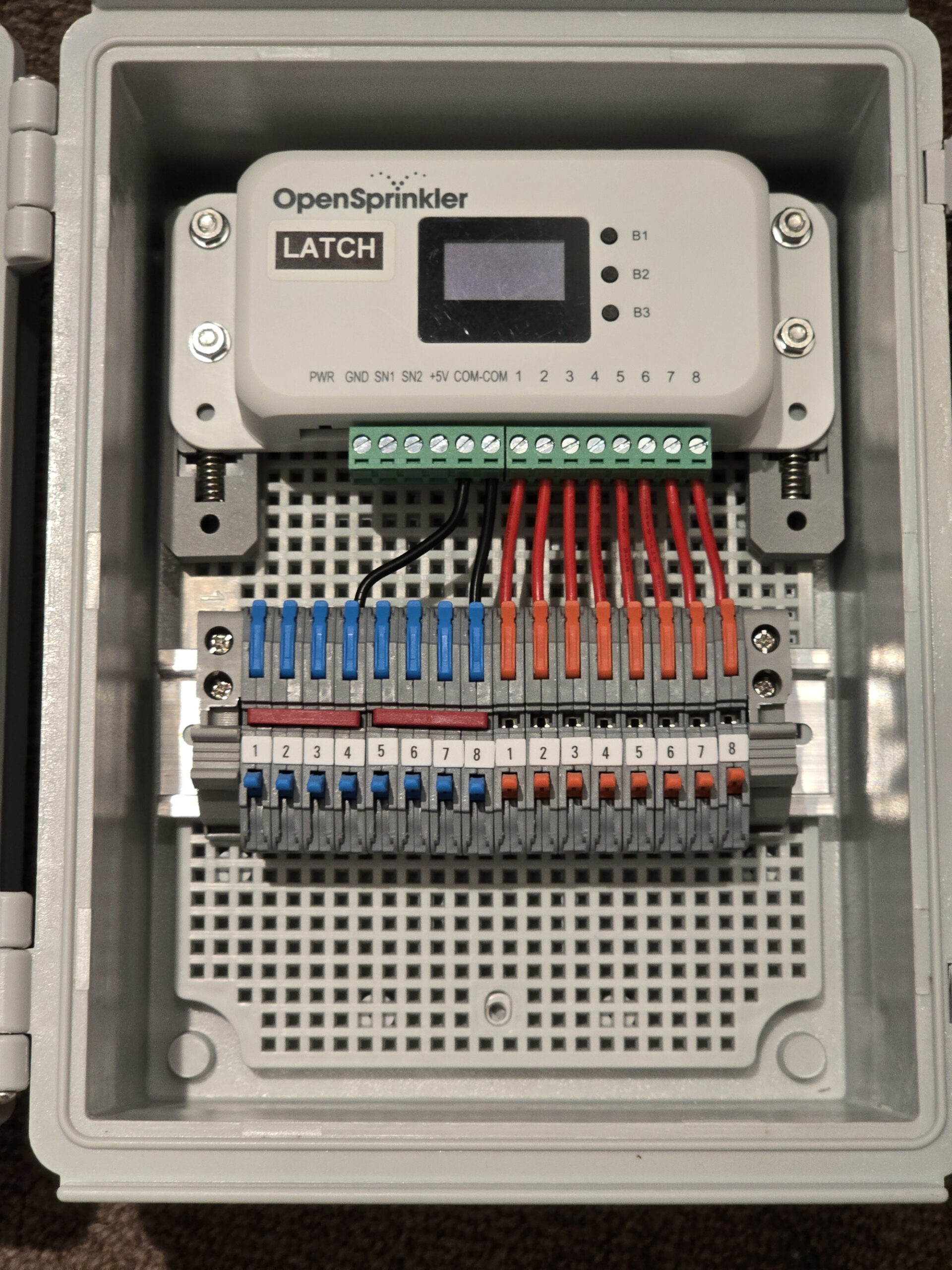
ThreadedParticipantHave just designed and building a small system with an OpenSprinker 3.3 LATCH I have a few new-user experiences and feature requests I hit that I’ll collect here. This is just feedback / suggestions, not any sort of complaint, so ignore it as you wish 🙏
1) The biggest wishlist item is I wish the two Sens1/Sen2 pins were instead A+/B+ for RS485 bus! This would enable multiple devices & sensors to be added, like RS485 soil, temp, humidity sensors and flow meter, all on the same pins, and allow much wider choice of sensors. My biggest hurdle was adding a flow meter somehow. All the of the tick/1L meter reading meters are accurate but physically huge. And all the smaller electromagnetic and ultrasonic meters need fast pulse reading and 3/4 wire systems. Whereas, there are great range small and large RS485 flow meters – many inexpensive. Meter-based RS485 meters only need power when being read, so I considered the OS RS485 expansion, but that seems uncertain. In the end I gave up and added a separate an Ecowitt WFC02 1″ ball-valve and flow meter to the system, since I am using their wireless soil sensors anyway. I’ll integrated them via HA. But in hindsight I wish OpenSprinker had one RS485 bus built in.
2) It’s awesome to have the Ethernet option! But the ribbon cable and dongle is kind of clunky. For the cost of the sub-board parts, just build one in IMO, save on the ribbon cable and connectors! For bonus points add PoE like Konnected do with their alarm board.
3) Feature suggestion: I drilled some holes to I could mount the controller on a DIN rail. It would be a nice-to-have to have an accessory option for a DIN mount clips you can bolt to the OpenSprinkler (the 3.4 case I guess).
4) A new-user experience FWIW: I was switching back from Ethernet to Wifi and I struggled to get that to happen. I was surprise that when I disconnected Ethernet it wouldn’t switch to Wifi. I couldn’t get the menus to work for me. I ended up watching videos and reading the manually trying to work out the button sequence and timing to get Wifi working again. I sorted it out, but it seems surprisingly hard.
5) A new-user experience FWIW: Use the web UI I struggled to find the system settings, until I spotted the “floating hamburger” menu. Now I know it’s there I’ll have no problems, but I felt to should be on the main menu, or somehow more obvious.
6) Feature suggestion: The screen is incredible scratch-prone! A small stick-on piece of a glass or hard plastic like a phone protector would be a welcome addition to the current build.
(WIP photo attached)
Attachments:
July 27, 2026 at 6:24 am #87075
RayKeymasterHi,
Thanks for sharing your experience and the picture. Very neat setup! A few quick responses:
1) Technically you can re-program Sen1 and Sen2 for other purposes such as RS485 – these two are connected to GPIOs (pins 3 and 10 respectively) so by modifying the firmware you can assign them other, more advanced functions. Though this requires firmware changes, with today’s generative AI engine like Codex or Claude Code, it’s relatively easy to do.
2) As your Latch controller is of v3.3, the add-on Ethernet module is really an after-thought, it was added after some users requested the wired Ethernet feature. That’s why we couldn’t have built it in, because the enclosure and product were never designed with wired Ethernet to begin with, it’s an add-on after the product has been released.
3) Good suggestion – our German distributor actually sells a 3D printed DIN adapter:
https://opensprinklershop.de/product/hutschienenhalter/
we will consider selling them on our website as well.4) The WiFi – wired Ethernet switch is mainly a limitation of the WiFi chip’s library. The controllers runs a small embedded microcontroller (ESP8266) – it does not run a Linux system, so it has no ability to seamlessly switch between WiFi and wired Ethernet. The software stack only supports one of them at a time and it cannot auto-switch between them on the fly. Again, this is a limitation imposed by the software library, there isn’t much we can do about it.
5) We recommend all users to browse through the online User Manual before starting:
https://opensprinkler.github.io/OpenSprinkler-Firmware/2.2.1/221_4_manual/
In addition, generative AIs are very knowledgeable about OpenSprinkler given all its documents including source code are publicly available online, so if you have any questions, you can simply type that into a gen AI chatbot and get answers.6) You may not have noticed this: the screen has a protective film on it – while the film itself is easy to scratch, you can peel that off to reveal the actual acrylic panel and that’s much more scratch resistent.
August 1, 2026 at 9:18 am #87144
ThreadedParticipantThanks for the info Ray.
-
AuthorPosts


- You must be logged in to reply to this topic.
OpenSprinkler › Forums › Comments, Suggestions, Requests › Wishlist and new-user experiences from an OpenSprinkler build